
Structure — chapters & scenes
This is where the plot stops being a shape and becomes a worked-out story. The StoryGraph gave you the foundation; Structure turns it into the actual chapters and scenesyour book will have — a far more detailed plot than you started with. The order is deliberate: first the chapters, then the scenes inside them.
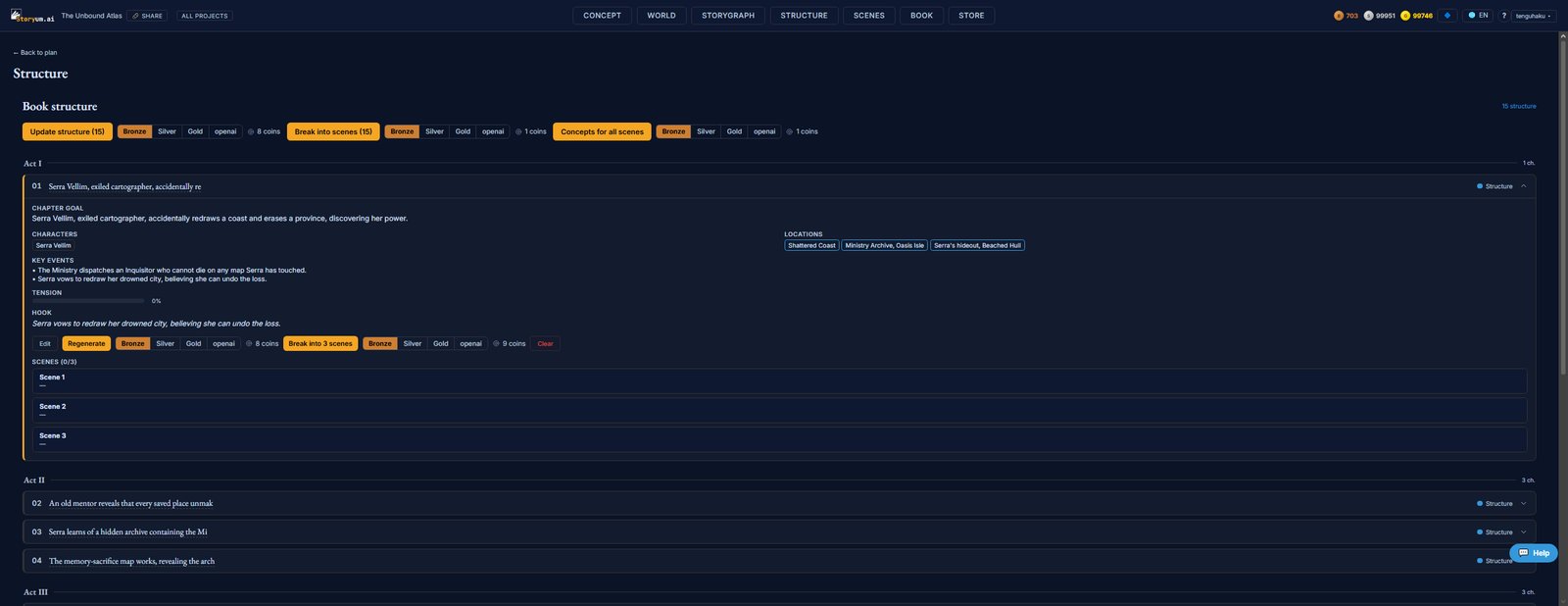
Step 1 — the chapters
First the book is laid out as acts and chapters. Each chapter is worked out in full — not just a title, but everything the writing needs to honour:
- Chapter goal — what the chapter is driving at — its one-line purpose in the arc
- Characters — who’s present in the chapter
- Locations — where it takes place
- Key events — the beats that must happen in it
- Tension — how much pressure the chapter carries (it climbs across the book)
- Hook — the line that pulls the reader into the next chapter
Update structure generates or regenerates the whole chapter skeleton from your synopsis and StoryGraph. You can also Regenerate or Edit any single chapter — the plot is yours to tune before you go deeper.
Step 2 — break into scenes
Once the chapters are right, each one is broken into scenes. A chapter of “Serra vows to redraw her drowned city” becomes three concrete scenes, each with its own concept — the granularity the render actually writes from. Break into scenes does the whole book at once; Break into N scenes on a single chapter does just that one (the scene count comes from your book settings).
With the chapters worked out and the scenes laid in, the plot is fully detailed — and the pipeline is ready to derive the scene vectors, the bible, and finally the prose.