Items are the significant objects of your story — a cursed diary, a keystone, a weapon that changes its bearer. Sub-step 3 of the world. An item carries 17 fields across 4 sections: what it is, what it does, what it means to the plot, and where it came from. As with characters and locations, a few core fields is plenty to start.
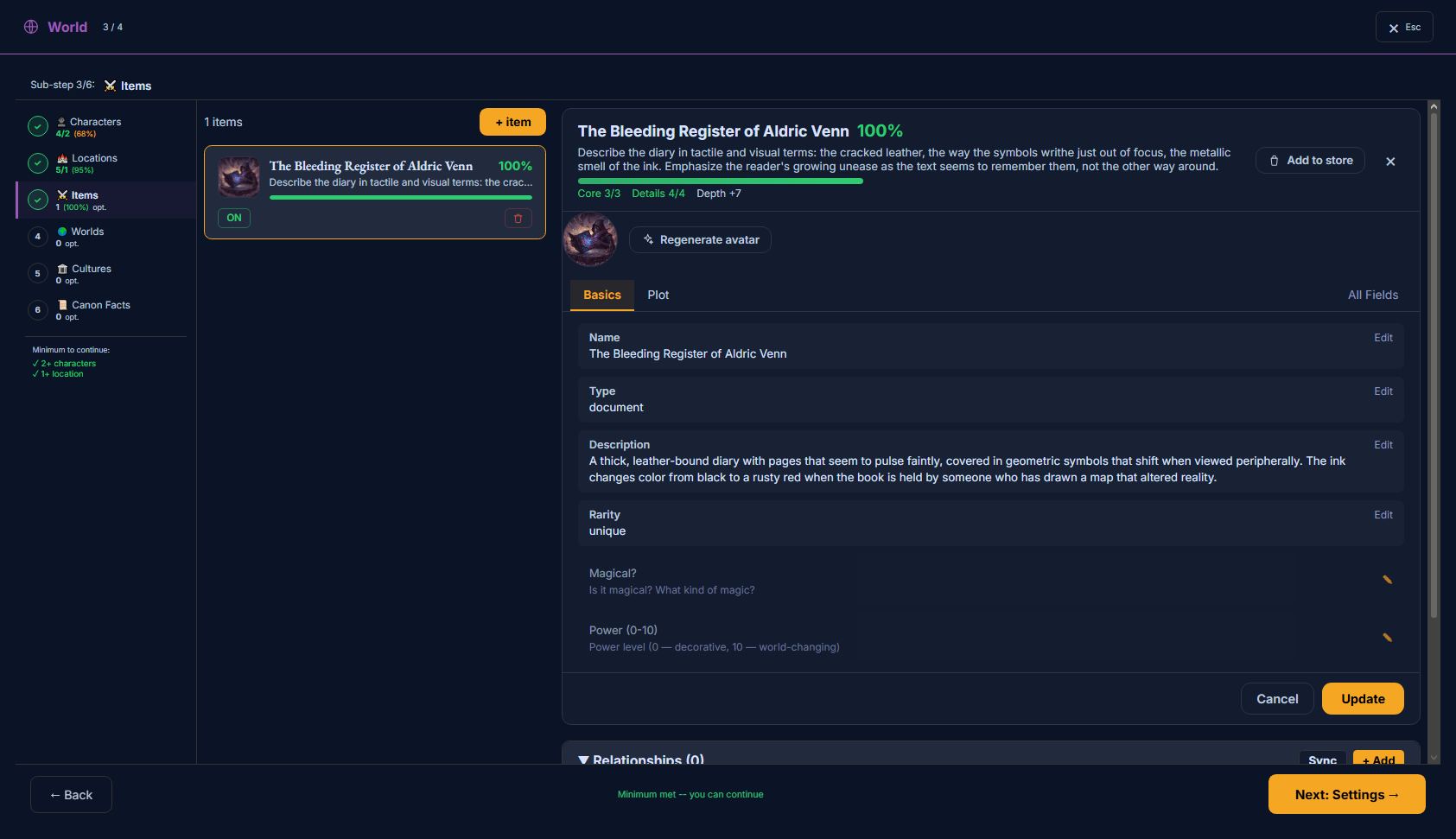
The Items page: your objects, added and edited like characters and locations.
What’s on this page
A list of your items — each a card with its completeness %, an on/off switch, and delete.
The same four ways to add as characters/locations: by hand, from your synopsis, one with AI, or from the Store.
A profile with tabs (Basics · Plot) plus “All Fields” — the full 4-section schema.
A completeness read-out (Core / Details / Depth).
How to use it
1Add an item and give it a name, type and description.
2Say what it does (magic, power, activation, limits) and what it means to the plot (function, effect, symbolism, stakes).
3Items are optional — add the ones that carry weight in the story.
Adding items
Items work exactly like characters and locations: the list carries a completeness %, an on/off switch, delete and the ✦ AI improve button, and “+ item” opens the same four ways to create — Manual, From Store, or AI Generate — plus “Regenerate items from synopsis”. (See the Characters page for the shared create/enrich flow.) Items are optional — there’s no minimum.
How to read the fields
Each field lists what it controls and what it affects. Keep an item focused: the writing draws on its nature (type, rarity, description, magic, power, limits) and its story weight (plot function, character effect, symbolism, stakes). The Origin & Ownership links (owner, location, factions) are structural — they tie the item into your world without adding words to the page.
The editor’s tabs (Basics · Plot) are a quick curated view; All Fields shows the full schema below, grouped into System · Properties · Narrative · Origin & Ownership.
Every field
All 17 fields, by section.
System / General
Identity, kind, and how special the item is.
Namecanon_name · text
The item’s name.
AffectsShapes how the item is written when it appears in a scene. Also the name used for it in the prose.
Enabledsys_enabled · toggle
Whether this item is active in the project.
AffectsStructural — organizes your project; it doesn’t directly change the prose. Disabled items are left out.
Typeitem_type · text
What kind of object it is — weapon, document, relic, tool…
AffectsShapes how the item is written when it appears in a scene.
Rarityitem_rarity · select
How rare/special the item is.
AffectsShapes how the item is written when it appears in a scene.
Options
common
uncommon
rare
epic
legendary
unique
Descriptionitem_description · textarea
What the item looks and feels like.
AffectsShapes how the item is written when it appears in a scene. The writer draws the object’s physical description from here.
Use itConcrete, sensory detail — how it looks, weighs, sounds.
Properties
What the item can do.
Magical?item_magical · text
Whether it’s magical, and what kind of magic.
AffectsShapes how the item is written when it appears in a scene.
Power (0–10)item_power_level · number
How powerful the item is (0 decorative, 10 world-changing).
AffectsShapes how the item is written when it appears in a scene.
Activationitem_activation · text
How the item is triggered or used.
AffectsShapes how the item is written when it appears in a scene.
Limitationitem_limitation · text
What limits or constrains the item.
AffectsShapes how the item is written when it appears in a scene. Costs and limits make an object feel real.
Narrative
What the item means to the story.
Plot Functionitem_plot_func · textarea
The item’s role in the plot — MacGuffin, weapon, key, clue…
AffectsShapes how the item is written when it appears in a scene.
Character Effectitem_char_effect · textarea
How the item changes the character who holds it.
AffectsShapes how the item is written when it appears in a scene.
Symbolismitem_symbol · text
What the item symbolizes.
AffectsShapes how the item is written when it appears in a scene.
Stakesitem_stakes · text
What’s at stake around the item — what happens if it’s lost or gained.
AffectsShapes how the item is written when it appears in a scene.
Origin & Ownership
Advanced
Where it came from, and its links to the rest of your world.
Originitem_origin · text
Who made the item and when.
AffectsShapes how the item is written when it appears in a scene.
Owner IDitem_owner_id · number
A link to the character who owns the item.
AffectsStructural — organizes your project; it doesn’t directly change the prose. Adds an “owns” edge to the relationship graph.
Location IDitem_location_id · number
A link to where the item is kept.
AffectsStructural — organizes your project; it doesn’t directly change the prose.
Factionsitem_factions · text
Groups tied to the item.
AffectsStructural — organizes your project; it doesn’t directly change the prose.
Join the community — questions, feedback, and other writers building novels with Storyum: Discord · Telegram