StoryumDocs
Open the app →
Reference · Steps

Canon Facts

Canon Facts are your story’s rules — short, unambiguous statements of what is true and what is forbidden in your world. Unlike the entity blocks (which describe your cast and setting), canon facts are constraints the writing must obey: they are fed into the pipeline and the prose is written to never break them. It’s the last sub-step of the World step (sub-step 6 of 6), and it’s optional — but it’s the strongest lever you have for keeping a long book consistent.
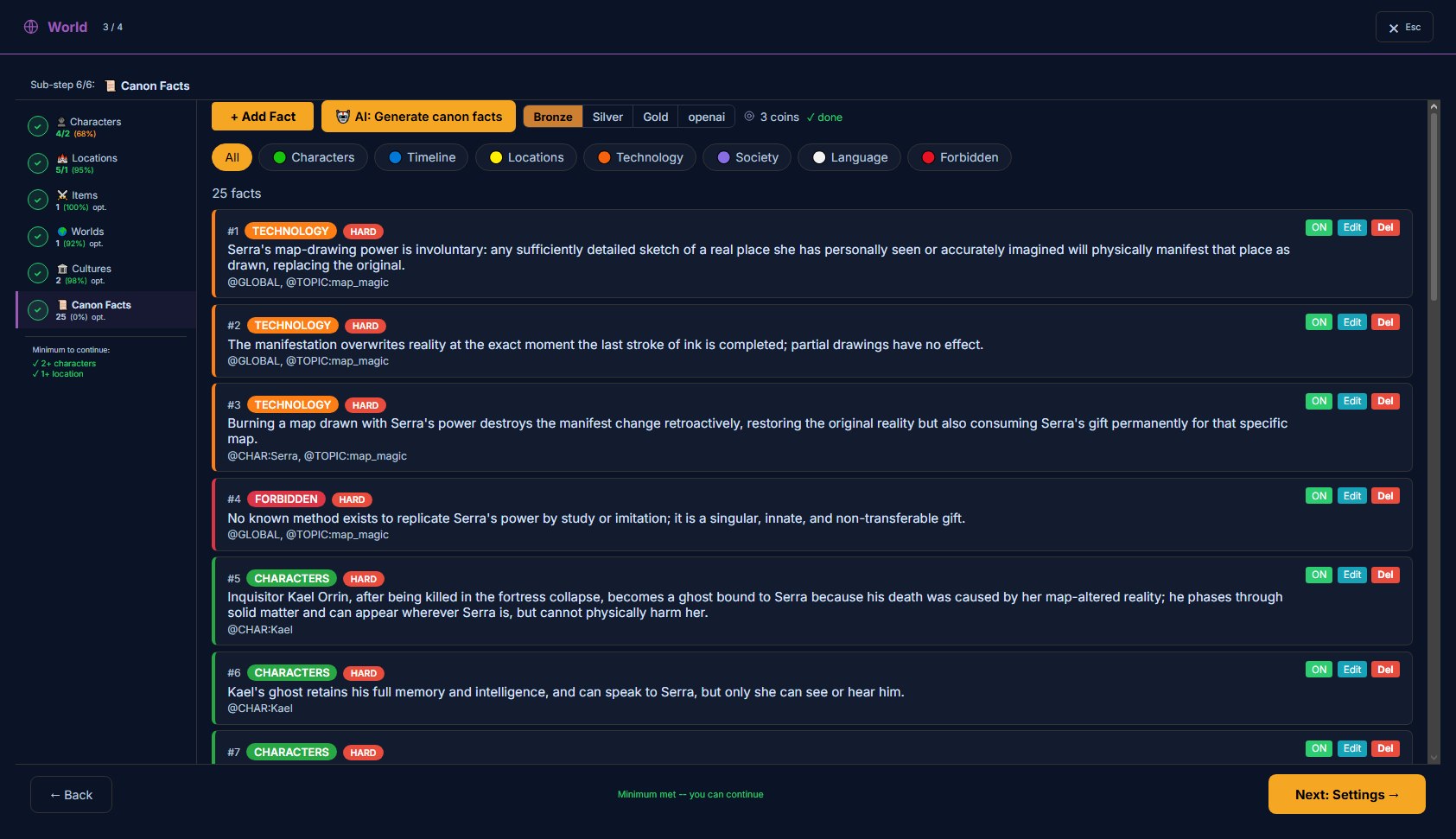
The Canon Facts editor — a list of rule cards with category and severity badges, scope tags, and category filters
The Canon Facts editor: rules grouped by category, each with a severity and scope tags.

What’s on this page

  • A list of facts, each a single rule with a category, a severity (hard / soft), scope tags, and an on/off toggle.
  • Category filters — All · Characters · Timeline · Locations · Technology · Society · Language · Forbidden.
  • “+ Add Fact” to write one by hand, and “AI: Generate canon facts” to draft a set from your story.
  • A quality-tier selector (Bronze · Silver · Gold) for the AI drafting, with its coin cost shown.

How to use it

  1. 1Add the rules that matter — the hard limits (what can’t happen) and the world truths that must hold across chapters.
  2. 2Give each fact a scope: @GLOBAL for a world rule, @CHAR:Name for a character-specific one, so it reaches the right scenes.
  3. 3Keep hard facts absolute and few; use soft for guidelines. Too many @GLOBAL facts crowd the context — tag them to scope.

Where this fits

Canon Facts is the last World sub-step (sub-step 6 of 6), and the only one that isn’t about describing your world — it’s about constraining it. Your characters, locations and world blocks tell the writing what things are like; canon facts tell it the rules that must never bend. It’s optional, but on a long book it’s the single strongest lever for keeping the story consistent from chapter 1 to the end.

How a fact reaches the writing. Every enabled fact is folded into the pipeline’s prompts as an explicit rule — at the structure, vector and bible stages, and so into the prose. Hard facts are marked as absolute; the writing is generated to stay inside them. This is the most direct “fed to the writing” of any block: a canon fact isn’t a hint, it’s a boundary.

A canon fact’s fields

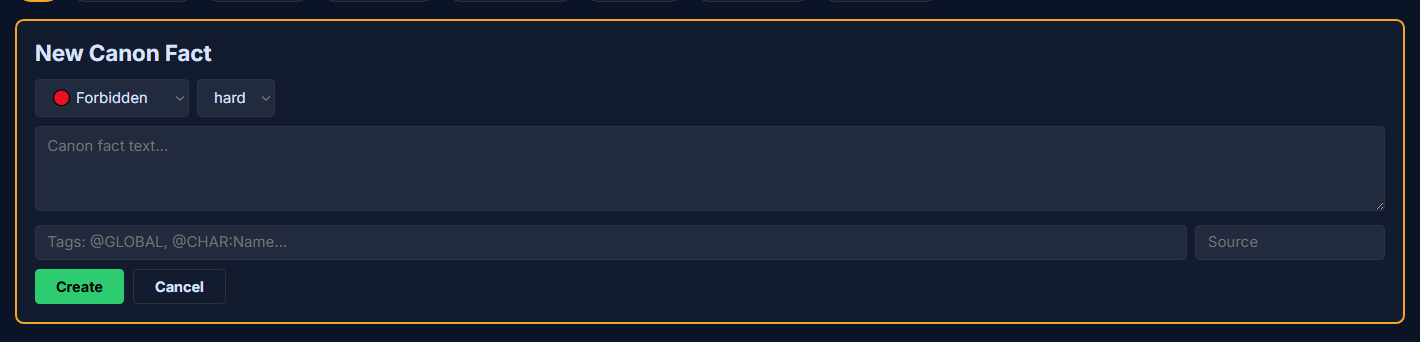
The New Canon Fact form — category, severity, fact text, tags and source
“+ Add Fact” — a rule is a short statement plus its category, severity and scope tags.
Fact textfact_text · textarea
The rule itself — one clear, unambiguous statement of what is (or is not) true.
AffectsFed to the writing — the strongest constraint there is. Enabled facts are injected into the pipeline’s prompts (structure, vector, bible → prose) as rules the writing must not break. Hard facts are treated as absolute; the prose is generated to stay inside them.
Use itWrite one fact per rule, stated plainly and testably. Include both what exists and what does NOT (a good negative fact prevents a whole class of mistakes).
ExampleNo character can use magic to raise the dead; death is permanent in this world.
Vague facts (“magic is rare”) are weak constraints — the model can read them many ways. Concrete, checkable rules hold far better.
Severityseverity · select
How binding the rule is.
AffectsMarks the fact in the injected block: hard rules carry a “[!] must-not-violate” marker, soft ones a “[~] guideline” marker. Hard facts are the ones the writing is held to absolutely.
Options
  • hardan absolute rule — the writing must never break it
  • softa guideline — a strong preference the writing should follow
Use itReserve hard for true invariants; use soft for tendencies and style leanings.
If everything is hard, nothing stands out. A short list of hard rules binds better than a long one.
Tags (scope)tags · tags
Where the fact applies — its scope in the story. Comma-separated.
AffectsDecides which scenes the fact reaches. @GLOBAL facts are injected everywhere; a scoped fact (@CHAR:Name, @TOPIC:theme) reaches only the scenes that touch that character or theme. The special @APPLIES_FROM / @APPLIES_UNTIL tags set a validity window (see below).
Use itTag every fact. @GLOBAL for a true world rule; @CHAR:<name> or @TOPIC:<theme> to keep a narrow fact from crowding scenes it doesn’t belong in.
Example@GLOBAL · @CHAR:Serra, @TOPIC:map_magic
An untagged fact behaves like a local note — it may not reach the prompt at all. Give it @GLOBAL or a scope tag so it actually binds.
Enabledenabled · toggle
Whether the fact is active (the ON toggle on each card).
AffectsOnly enabled facts are injected. Turning a fact off removes it from every prompt without deleting it — useful for retiring a rule or testing its effect.
Sourcesource · text
An optional note on where the rule came from (e.g. author decision, historical).
AffectsAuthoring reference only — your own bookkeeping. It isn’t sent to the writing; AI-drafted facts are stamped as generated for you to review.

Categories

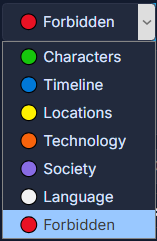
The category dropdown — Characters, Timeline, Locations, Technology, Society, Language, Forbidden
Seven categories — they group and filter your rules; they don’t change how strictly a rule binds.
Categorycategory · select
Which kind of rule this is — used to group and filter the list.
AffectsOrganizes the list (grouping + the filter chips) and labels the fact inside the injected block. It doesn’t change how strictly the rule binds — that’s severity.
Options
  • Characterswho people are and what they can/can’t do
  • Timelinechronology, order of events, what has/hasn’t happened yet
  • Locationsplaces and their properties
  • Technologytech level, science, magic-system mechanics
  • Societydaily life, customs, social structure
  • Languagehow people speak, naming, register
  • Forbiddenhard prohibitions — what must never appear
Use itPick the closest fit; it only affects grouping. “Forbidden” reads well for absolute bans.

Scope tags — where a fact applies

A fact’s tags decide which scenes it reaches. This is what lets you keep a hundred rules without drowning every scene in all of them — each fact only travels where it belongs.

@GLOBAL — a true world rule; injected into every scene. @CHAR:Name — reaches only scenes with that character. @TOPIC:theme — reaches only scenes about that theme. Facts you leave untagged behave like local notes and may not reach the prompt, so give each one a scope.

Validity window — a fact that expires. Two special tags let a rule apply only for part of the book: @APPLIES_FROM:ch3_sc1 makes a fact take effect only from that scene onward (so canon can’t reveal an event before the prose has shown it), and @APPLIES_UNTIL:ch10_sc4retires it after that scene (so a Part-1-only truth doesn’t bleed into Part 2). With both, the fact is live only inside that window; with neither, it’s always live. This is how a story can honestly change — “the hero is an ordinary soldier” can be true early and stop being true later.

AI: Generate canon facts

AI: Generate canon facts drafts a set of rules from your story — it reads your synopsis and cast so the facts anchor to your world, not generic genre tropes, and it tags them with scopes (@GLOBAL / @CHAR / @TOPIC) for you. The pill row picks the quality tier(Bronze · Silver · Gold, higher being more capable) and shows the coin cost before you commit. Generated facts are written in your project’s language, and each is marked as AI-drafted — review them, then keep, edit or delete.

Keeping it focused

Canon is powerful because it’s injected verbatim — which also means it costs context. A short set of sharp rules beats a long list of vague ones. Past about 50 facts the editor nudges you to tag them, so the pipeline can prioritise the ones a given scene actually needs. Reserve hard for real invariants, scope everything with tags, and turn a rule off rather than deleting it when you just want to test its effect.

Join the community — questions, feedback, and other writers building novels with Storyum: Discord · Telegram
© 2026 Storyum. All rights reserved. Storyum™, the Storyum method, software and designs are proprietary.