
The Projects page
The Projects page is where every book lives. It is the first screen after sign-in: create a new project here, then open any existing one to build its world, engineer its plot and write it. Each project is one book — its own world, cast, structure and prose, kept fully separate from the others.
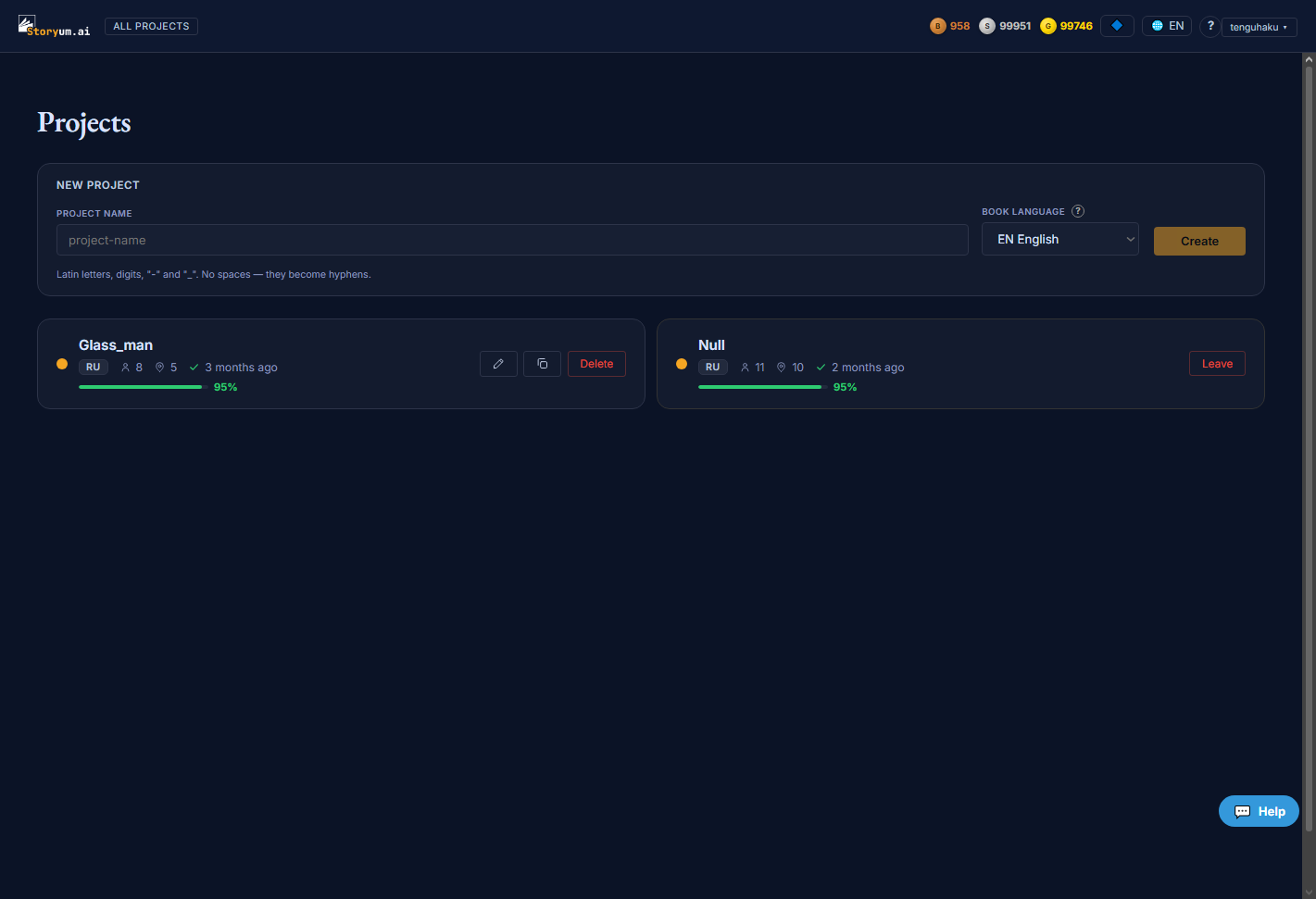
What’s on this page
- A “New project” block — name a book, choose its language, and create it.
- A card for every project you own or that has been shared with you, each showing its language, cast and location counts, when it was last touched, and a setup-completeness bar.
- Per-card actions: on your own projects — rename, duplicate, delete; on a project shared with you — only “Leave”.
- The top bar: your three star balances (bronze · silver · gold), the interface-language switcher, help, and the account menu.
How to use it
- 1Type a name for the book (Latin letters, digits, “-” or “_”).
- 2Choose the book’s language.
- 3Press Create — the new project opens and you begin with its world and entities.
- 4Come back here any time to reopen, rename, duplicate or delete a project from its card.

New project
The create form at the top of the page. Two fields, then Create.
name · textThe_Ascentlanguage · selectEN Englishthe book is generated in EnglishRU Russianthe book is generated in Russian
EN EnglishThe project card
Below the create form, every project gets a card. The card is a read-out, not a form — it summarizes the project at a glance and carries the actions you can take on it. Click the card to open the project.

- Language badge — the book’s language (as chosen at creation).
- Cast count — how many Characters the project has.
- Location count — how many Locations the project has.
- Status & time — when the project was last touched, with an icon for its pipeline state — a check when a run has completed, a clock while one is running.
- Setup bar — a rough completeness estimate — it climbs as the project gains a description, a cast and locations, and once the pipeline has run. It is a guide to how far along setup is, not a quality score.
Card actions — and who can do what
The buttons on a card depend on whether the project is yours or was shared with you:
- Rename — change the project’s name (owner only).
- Duplicate — make an independent copy of the whole project — world, cast and structure included (owner only).
- Delete — remove the project for good (owner only).
- Leave — on a project shared with you, step out of it — you keep no copy, and it is the only action a collaborator has.
The top bar

Above the page, three balances show your stars — bronze, silverand gold. Stars are what operations spend; different tiers of work draw on different stars, and the balances refresh as you work. Beside them sit the interface-language switcher (which changes the app’s own text, not the book’s language), a help button, and your account menu.