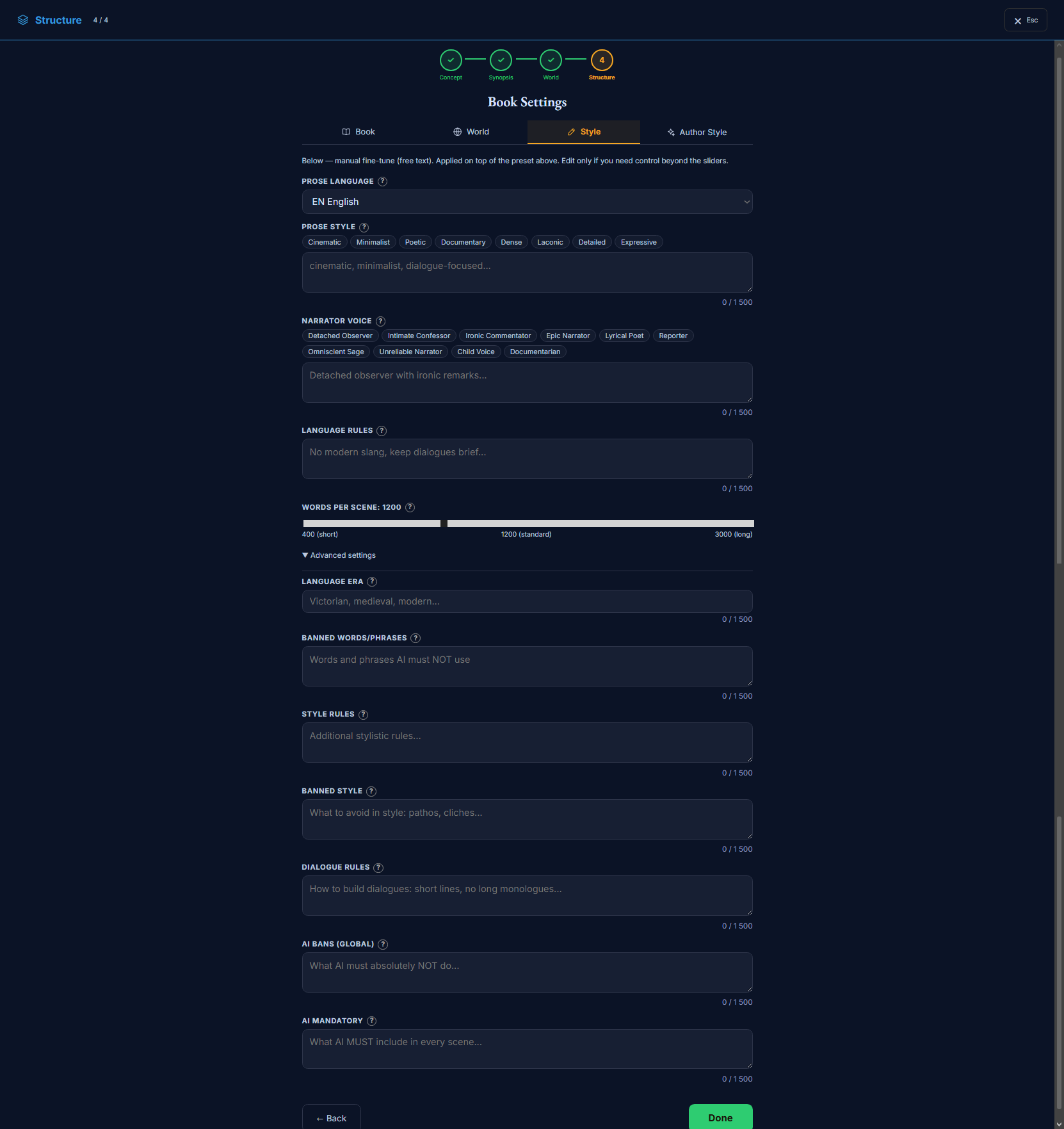
The Style tab tunes how the prose reads — the writing style, the narrator’s voice, how long scenes run, and the language rules and bans the writing must respect. It’s the third Book Settings tab, and it’s the manual, free-text layer: it’s applied on top of the Author Style preset (the next tab), so reach for it when you want control beyond the sliders. Everything here is optional.
Book Settings → Style: the manual fine-tune — prose style, voice, scene length, and the bans.
What’s on this page
Prose language, prose style (with quick chips), narrator voice (with quick chips), and language rules.
A “Words per scene” slider — 400 (short) · 1200 (standard) · 3000 (long).
An “Advanced settings” drawer: language era, banned words, style rules, banned style, dialogue rules, and the global AI bans / mandatory elements.
How to use it
1Leave it alone if the Author Style preset already reads right — this tab is for going further.
2Use the chips to seed prose style and narrator voice, then edit the free text to taste.
3Set the bans (banned words, banned style, AI bans) to stamp out habits you don’t want — they’re enforced through to the fix stage.
The Style tab is the free-text layer. The next tab, Author Style, gives you sliders and a preset for the overall voice; this tab is where you go beyond them — writing exact rules, naming the habits to avoid, and setting scene length. It’s applied on top ofthe Author Style preset, so you only need it when the sliders don’t reach far enough.
Bans are enforced, not just suggested. The banned-words, banned-style and AI-bans fields don’t only steer the writer — they’re carried through to the quality/fix pass, so a habit you ban here gets caught and corrected downstream, not merely discouraged. That makes this tab the reliable place to stamp out a recurring tic.
The Style tab, field by field
Prose, voice and scene length sit up front; the finer language flavour and the do/don’t rules are under “Advanced settings”. The chip rows on prose style and narrator voice are just shortcuts — they drop words into the free-text box, which is the real control.
Prose & voice
How the text reads and who tells it. The chip rows are shortcuts — the free text is the real control.
Prose languageselect
The language the book is written in.
AffectsSets the project’s output language for the whole pipeline (prose, and AI-drafted content like entities and canon facts). Pragmatically ru ↔ en; other choices fall back to English.
⚠This is the project’s language — changing it here changes the language of everything generated, not just this tab.
Prose stylebp_writing_style · textarea
How the AI writes — seed it from the chips (Cinematic, Minimalist, Poetic, Documentary, Dense, Laconic, Detailed, Expressive) or write your own.
AffectsFed to the writing — read into the scene context so the prose follows it. The single biggest steer on how the sentences feel.
ExampleCinematic and lean; scene-driven and dialogue-forward; sparing with metaphor.
Narrator voicebp_narrative_voice · textarea
Who tells the story — seed it from the chips (Detached Observer, Intimate Confessor, Ironic Commentator, Epic Narrator, Lyrical Poet, Reporter, Omniscient Sage, Unreliable Narrator, Child Voice, Documentarian) or write your own.
AffectsFed to the writing — read into the scene context so the prose follows it. Sets the narrator’s stance and attitude.
ExampleA detached observer with dry, ironic remarks; never sentimental.
Language ruleswr_language_rules · textarea
Constraints and requirements for the text.
AffectsFed to the writing — read into the scene context so the prose follows it.
ExampleNo modern slang; keep dialogue clipped; British spelling throughout.
Words per scenebp_target_words_per_scene · number
Target length of each scene — the slider runs 400 (short) · 1200 (standard) · 3000 (long).
AffectsStructural / render — the main lever on scene length: the render sizes each scene to this target. Lower reads punchy; higher reads immersive.
Example1200
⚠This is the scene-length lever the render actually uses — set length here, not per individual scene.
Advanced — language & bans
Advanced
Under “Advanced settings”. Fine language flavour, plus the do/don’t rules. The bans are enforced through to the fix stage, so they’re the reliable way to kill a habit.
Language erawr_language_era · text
The period flavour of the language — modern, archaic, or a specific era.
AffectsFed to the writing — read into the scene context so the prose follows it. Tunes vocabulary and idiom to a period.
ExampleLate-Victorian; formal register, period idiom, no anachronisms.
Banned words / phraseswr_language_banned · textarea
Words and phrases the AI must never use in the prose.
AffectsFed to the writing AND enforced at the fix stage — bans set here are carried through to the quality/fix pass, not just suggested to the writer.
Examplevery · suddenly · somehow · “a shiver ran down” · “little did they know”.
Style ruleswr_style_rules · textarea
Positive style rules the AI should always follow.
AffectsFed to the writing — read into the scene context so the prose follows it.
ExampleLead with action; one strong image per paragraph; vary sentence length.
Banned stylewr_style_banned · textarea
Stylistic habits to avoid — clichés, purple prose, and so on.
AffectsFed to the writing AND enforced at the fix stage — bans set here are carried through to the quality/fix pass, not just suggested to the writer.
ExamplePurple prose; pathos; clichés; rhetorical questions aimed at the reader.
Dialogue ruleswr_dialogue_rules · textarea
How dialogue should be written — tags, rhythm, formality.
AffectsFed to the writing — read into the scene context so the prose follows it. Shapes how characters speak on the page.
ExampleShort lines; no long monologues; “said” over fancy tags; subtext over exposition.
AI bans (global)wr_llm_global_banned · textarea
Hard content bans the AI must respect in every scene.
AffectsFed to the writing AND enforced at the fix stage — bans set here are carried through to the quality/fix pass, not just suggested to the writer. The strongest prohibition layer — global, every scene.
ExampleNo head-hopping within a scene; no summarising emotions; no modern references.
AI mandatorywr_llm_global_mandatory · textarea
Elements the AI must always include in the prose.
AffectsFed to the writing — read into the scene context so the prose follows it. Requirements applied to every scene.
ExampleEnd each scene on a turn or a hook; ground every scene in one concrete sensory detail.
Join the community — questions, feedback, and other writers building novels with Storyum: Discord · Telegram