StoryumDocs
Open the app →
Reference · Book Settings

Book Settings — Book

Book Settings is where you set the shape of the whole book: its genre and tone, how long it is, how it’s told, and how it’s structured. It opens as the Structure step (step 4 of setup) and has four tabs — Book, World, Style and Author Style. This page covers the Book tab: the top-level choices that steer every chapter the pipeline plans and writes.
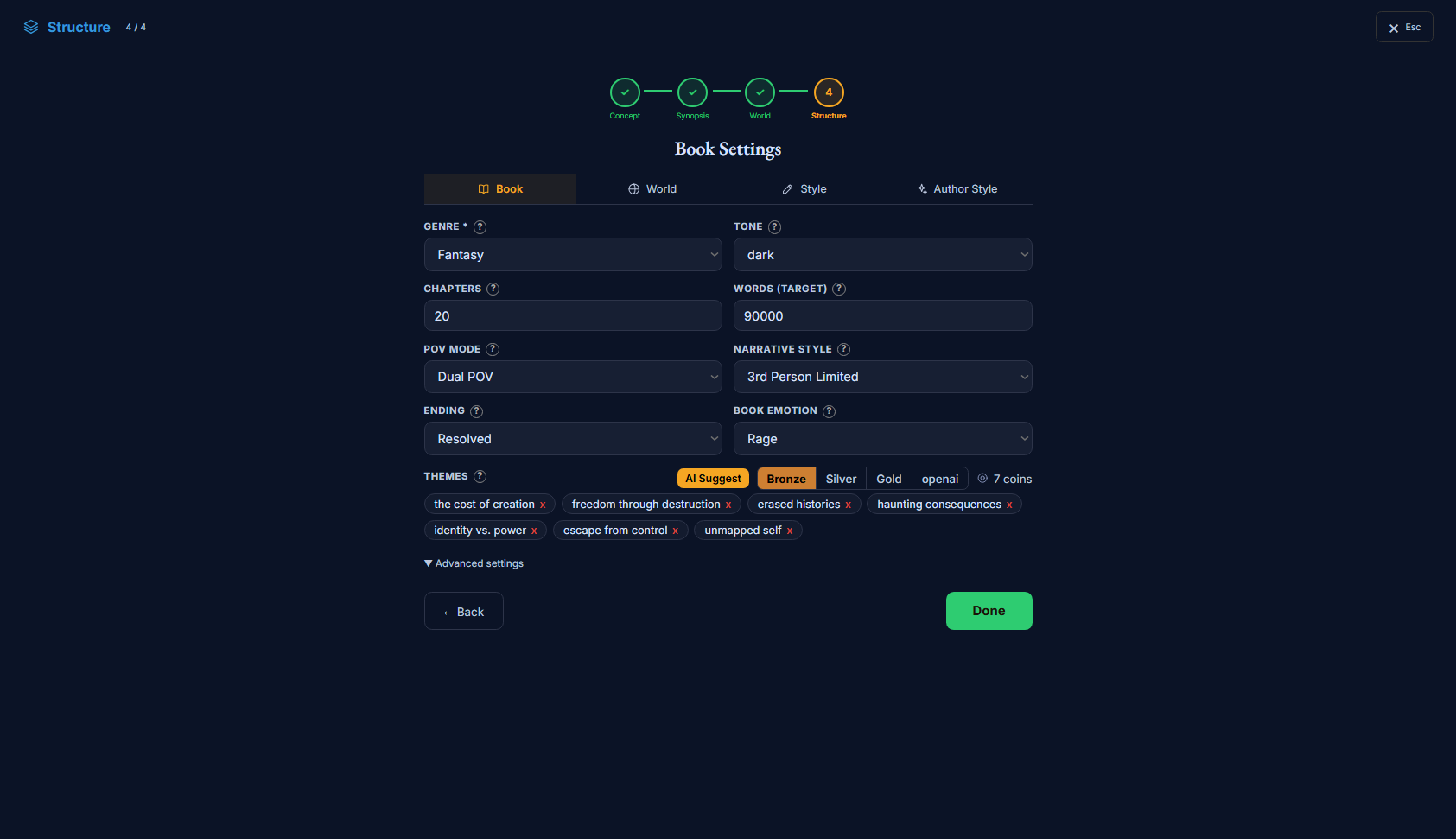
The Book Settings modal, Book tab — genre, tone, chapters, word target, POV, narrative style, ending, emotion, themes
Book Settings → Book: the book-level choices, with more under “Advanced settings”.

What’s on this page

  • The four Book Settings tabs — Book · World · Style · Author Style. This page is the Book tab.
  • The basics: genre, tone, chapter count, word target, POV mode, narrative style, ending, and the book’s dominant emotion.
  • Themes — with an “AI Suggest” button (quality tiers + coin cost) that drafts them from your story.
  • An “Advanced settings” drawer: structure framework, scenes per chapter, tension curve, event density, stakes, central mystery, and structure rules.

How to use it

  1. 1Set genre and length first — they anchor everything downstream (the pipeline sizes chapters to your word target).
  2. 2Pick how it’s told (POV mode + narrative style) and the ending/emotion you’re aiming for.
  3. 3Open Advanced only if you want to shape pacing and structure directly — the defaults are sensible.

The four tabs

Book Settings opens as the Structure step and splits into four tabs. Book (this page) sets the book’s shape. World sets the rules of the setting (genre, technology, magic, society). Style tunes how the prose reads. Author Style shapes the narrative voice and its bans. Each has its own Reference page — the others are on the way.

How these reach the book. The Book-tab choices are saved as your project’s book-level settings and read by the pipeline when it plans the structure and writes each scene — so a change here ripples through every chapter the next time you build. They set direction; the actual plot lives in your Synopsis, StoryGraph and Canon Facts.

The Book tab, field by field

The tab shows the basics up front and hides the finer structure controls behind “Advanced settings”. Genre is the only required field; everything else has a sensible default, so you can set two or three things and move on.

The basics

The top-level shape of the book. Genre is required; the rest have sensible defaults.

Genrebp_genre · select
The book’s primary genre. Required.
AffectsThe strongest single steer — it shapes the writing style, the metaphors, and the world-building defaults, and it flows through structure planning into every scene. Choosing it also pre-fills matching World-tab defaults you can override.
Options
  • Fantasy / Sci-fi / Cyberpunk / Steampunk / Post-apospeculative worlds — invented rules, tech or magic
  • Detective / Thriller / Horror / Noirplot-driven tension and dread
  • Literary fiction / Realism / Historical / Romance / Dystopiagrounded, character- or theme-forward
Use itPick the closest primary genre; keep it consistent with the World and Author Style tabs.
Tonebp_tone · select
The overall mood of the book.
AffectsFed to the writing — one of the book-level settings the pipeline reads when it plans the structure and writes each scene. Colours the narration’s mood across chapters.
Options
  • dark · tense · melancholic · gothicheavy, foreboding moods
  • light · whimsical · comedic · satiricallighter, playful moods
  • epic · intimate · philosophical · dreamlike · ironicregister and distance of the telling
Chaptersbp_num_chapters · number
How many chapters to plan (5–100).
AffectsStructural — sets how many chapters the skeleton lays out, which (with the word target) drives total length and pacing.
Example20
Words (target)bp_target_total_words · number
Target word count for the whole book (10k–500k, in 10k steps).
AffectsStructural — the pipeline sizes chapters and scenes to hit it. With the chapter count it sets the average chapter length. (Per-scene length also has a finer lever on the Style/Structure side.)
Example90000
A word target far out of step with the chapter count yields very long or very short chapters — keep the two in balance.
POV modebp_pov_mode · select
How many viewpoints the book follows.
AffectsFed to the writing — one of the book-level settings the pipeline reads when it plans the structure and writes each scene. Shapes how the structure assigns scenes to viewpoint characters.
Options
  • Single POVone viewpoint throughout
  • Dual POVtwo alternating viewpoints
  • Multi POVseveral viewpoints
  • Omniscienta narrator above any single character
Narrative stylebp_pov_style · select
The grammatical person and depth of interiority the narration uses.
AffectsFed to the writing — one of the book-level settings the pipeline reads when it plans the structure and writes each scene. Sets how close the prose sits to a character’s inner life.
Options
  • 1st persontold as “I” — closest interiority
  • 3rd limitedthird person, anchored to one character at a time
  • 3rd omniscientthird person with a wider, all-seeing view
Endingbp_ending_type · select
The kind of ending you’re aiming for.
AffectsFed to the writing — one of the book-level settings the pipeline reads when it plans the structure and writes each scene. Guides the final act’s shape.
Options
  • Resolvedthreads tied off
  • Opendeliberately unresolved
  • Tragica downfall ending
  • Bittersweeta win with a cost
  • Ambiguousread-it-both-ways
Book emotionbp_dominant_emotion · select
The dominant emotion you want the reader to feel throughout.
AffectsFed to the writing — a book-level emotional target the enrichment stage leans scenes toward (hope, fear, rage, wonder, despair, love, and more).
ExampleRage — a book that burns with grief turned outward.
Themesthemes · tags
The recurring ideas the story explores. Draft them with “AI Suggest”, or remove any you don’t want.
AffectsFed to the writing — the themes are injected into structure planning (as a THEMES section) so the plot returns to them. “AI Suggest” drafts them from your story at a chosen quality tier for a coin cost (or your own key).
Examplethe cost of creation · freedom through destruction · identity vs. power
Themes are drafted from your synopsis — fill the Synopsis first for the suggestion to be on-target.

Advanced — structure

Advanced

Under “Advanced settings”. Shape the pacing and structure directly; the defaults are sensible.

Structurebp_structure_type · select
The narrative framework the book is built on.
AffectsStructural — sets the beat pattern the skeleton and outline follow.
Options
  • 3-Actsetup · confrontation · resolution
  • 5-Acta finer five-part arc
  • Hero’s Journeythe departure–initiation–return monomyth
  • Customno imposed framework
Scenes / chapterbp_scenes_per_chapter · number
How many scenes each chapter is split into (2–8).
AffectsStructural — sets the scene count per chapter the skeleton generates.
Example4
Tension curvebp_tension_curve · select
How tension rises and falls across the whole book.
AffectsStructural — steers how the outline distributes high- and low-tension beats.
Options
  • Gradual Risesteadily building to the climax
  • Wavespeaks and troughs throughout
  • Plateau Burstscalm stretches broken by spikes
  • Constantsustained pressure
Event densitybp_event_density · select
How much happens per scene.
AffectsStructural — sparse and reflective vs. packed with events.
Options
  • Lowspacious, reflective scenes
  • Mediuma balanced pace
  • Highevent-packed scenes
Stakesbp_stakes_level · select
How high the consequences run.
AffectsFed to the writing — one of the book-level settings the pipeline reads when it plans the structure and writes each scene. Sets the scale of what’s at risk.
Options
  • Personalone life or relationship
  • Family / Communitya small circle
  • National / Globala society or the world
  • Existentialeverything
Central mysterybp_central_mystery · text
An optional core question or secret that drives reader curiosity.
AffectsFed to the writing — one of the book-level settings the pipeline reads when it plans the structure and writes each scene. When set, the structure plants and paces it as a running hook. Optional.
ExampleWho really survived the fall of the old capital — and why do they want the map back?

Advanced — structure rules

Advanced

Finer levers on how chapters open, bridge and crest. Safe to leave at their defaults.

Scene position rulessc_position_rules · toggle
Enforce where key beats land within each chapter.
AffectsStructural — when on, the scene planner holds important beats to their intended positions.
Scene bridgessc_bridges_enabled · toggle
Add connective scenes between chapters for smoother flow.
AffectsStructural — when on, the planner inserts bridging beats so chapters hand off cleanly.
Chapter hook stylesc_chapter_hook_style · select
How each chapter opens to pull the reader in.
AffectsFed to the writing — steers the opening beat of each chapter.
Options
  • Open Questionstart on an unanswered question
  • Revelationopen with something revealed
  • Cliffhangerpick up mid-tension
  • Shifta change of scene, time or POV
Crisis scene stylesc_crisis_style · select
How crisis moments are paced.
AffectsFed to the writing — sets the rhythm of the book’s crisis beats.
Options
  • Compressed (fast pace)short, clipped, urgent
  • Extendeddrawn out for weight
  • Internalcrisis felt from inside the character
Through-line (central tension)sc_through_line · text
A single thread that runs through every chapter to keep focus.
AffectsFed to the writing — one of the book-level settings the pipeline reads when it plans the structure and writes each scene. When set, it’s carried across chapters so the book stays on one spine. Optional.
ExampleCan she undo what she drew without erasing herself along with it?

Advanced settings

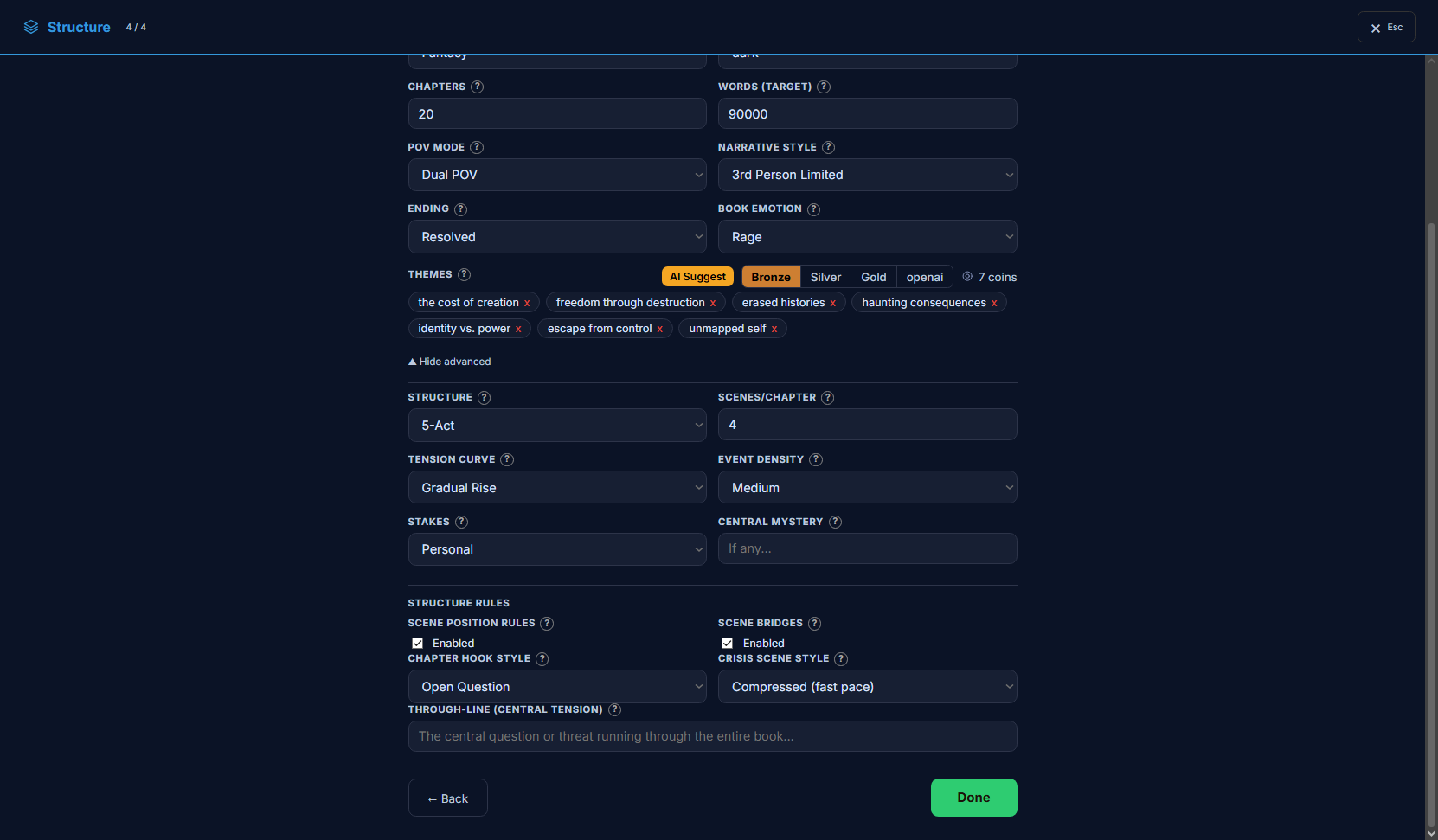
The Advanced settings drawer — structure, scenes per chapter, tension curve, event density, stakes, central mystery, and structure rules
“Advanced settings” exposes the structure and pacing levers, plus the structure rules.

Opening Advanced settings reveals how the book is built — the structure framework, the tension curve, how many scenes fill a chapter, how much happens per scene, and the structure rules that govern how chapters open, bridge and crest. These are documented in the two “Advanced” groups above. Most books never need them, but they’re the direct way to shape pacing without touching the plot itself.

Join the community — questions, feedback, and other writers building novels with Storyum: Discord · Telegram
© 2026 Storyum. All rights reserved. Storyum™, the Storyum method, software and designs are proprietary.