StoryGraph · Operators
AMPLIFY
AMPLIFY turns it up. It scales a channel — tension, stakes — louder downstream: the same beat, dialed hotter.

AMPLIFYOperator
Turns a signal up downstream — more tension, higher stakes.
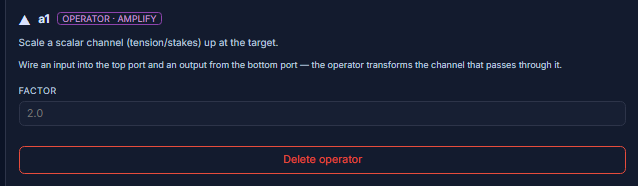
AMPLIFY scales a scalar channel up at the target. Point it at tension or stakes and set a factor above 1 to intensify the beat the wire lands on.
AffectsThe intensity of a channel downstream — raises tension or stakes.
Wire itPut it on a tension or stakes wire and set Factor above 1 where the beat should spike.
Parameters
Factor
factor · numberHow much to scale the channel up.
AffectsAbove 1 intensifies the channel downstream.
Example
2.0Use-case variants
- Escalation — the stakes climb toward the climax
- Turning up the heat — a run of beats each hotter than the last
Amplify everything and nothing stands out — reserve it for the beats that should spike.
In the editor