StoryGraph · Node types
Turn
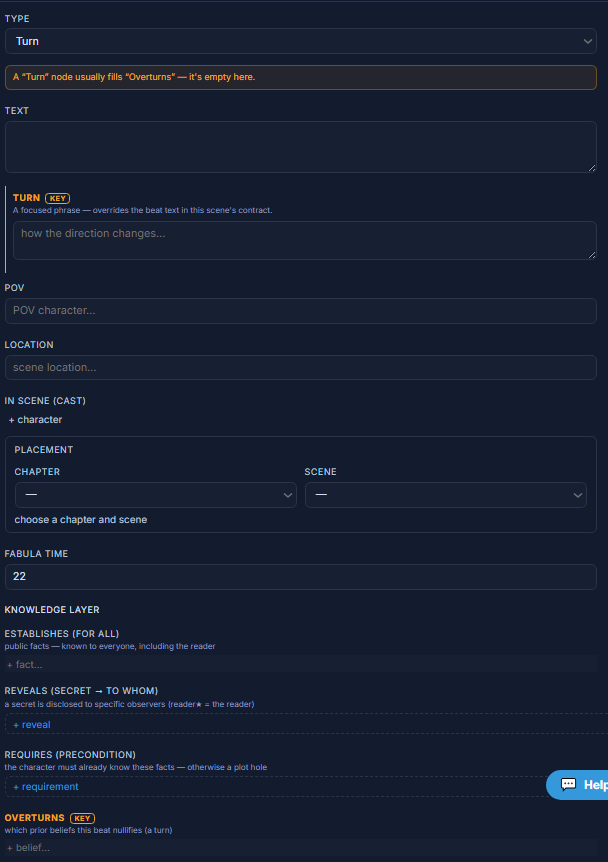
Turn is where the story changes course — the pivot where it stops going one way and starts going another. Its “Overturns” field marks the expectation the turn nullifies.

TurnNode type
A change of direction in the arc.
Turn is a pivot beat. It carries the change of direction as its defining phrase, and its knowledge-layer “Overturns” field marks which prior belief or expectation the pivot cancels.
AffectsThe direction of the arc from that point; it overturns a prior belief or expectation.
Wire itPlace it at act breaks and pivots — the point where the story’s direction genuinely changes.
Parameters
The turn / Overturnstext
How the direction changes, and the expectation it nullifies.
AffectsRedirects the arc from that beat on; the engine treats it as a turn in the scene contract.
Use-case variants
- Rising turn — the pivot escalates toward the climax
- Falling turn — the pivot begins the descent or the aftermath
A turn with nothing to overturn is just another beat — it should change a direction the reader felt.
In the editor