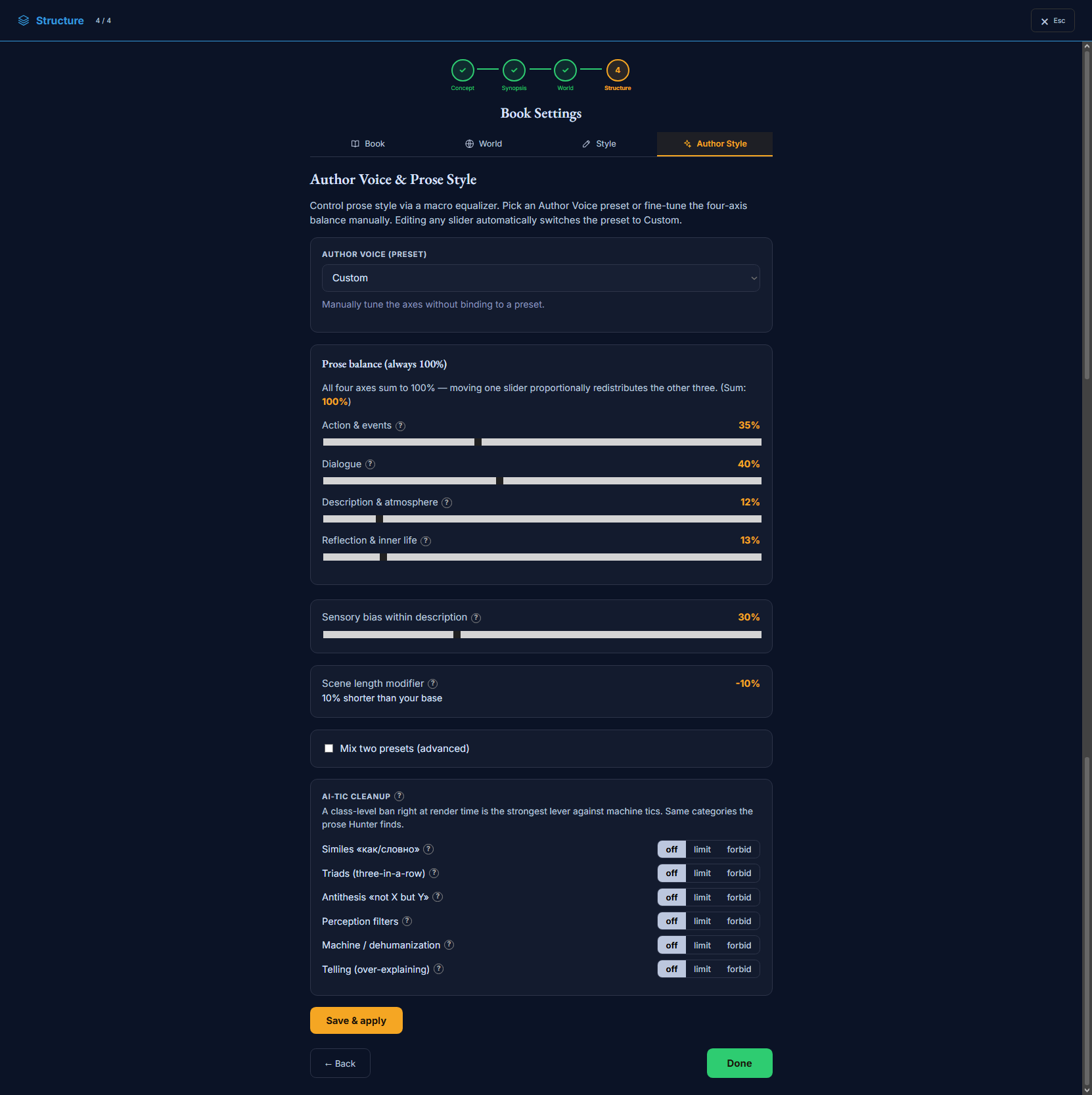
The Author Style tab is the macro equalizer for your prose. Instead of writing rules, you set the balance of the writing on four axes, pick an Author Voice preset, and — most powerfully — ban the machine tics at render time. It’s the last Book Settings tab, and the highest-leverage one for how the finished prose actually reads.
Book Settings → Author Style: the four-axis balance, an Author Voice preset, and render-time tic bans.
What’s on this page
An Author Voice preset — a named style that sets the whole balance at once (editing any slider switches it to Custom).
Prose balance: four axes (Action, Dialogue, Description, Reflection) that always sum to 100%.
A sensory-bias slider, and a scene-length read-out that the balance derives automatically.
AI-tic cleanup: six machine-writing habits you can leave on, limit, or forbid at render time.
An advanced option to blend two presets by weight.
How to use it
1Start from a preset that fits your book, then nudge the four axes if you want a different balance.
2Set the sensory bias for how textured the description runs.
3Turn the AI-tic bans to “forbid” for the habits you never want — this is the strongest lever against machine prose.
4Press “Save & apply” — the balance and bans are mapped into the render.
Where the Style tab is free text, Author Style is a macro equalizer. You set the proportion of the writing that goes to action, dialogue, description and inner life — four axes that always add up to 100%, so pushing one up pulls the others down. Pick an Author Voicepreset to set them all at once, then nudge. It’s the fastest way to change how the prose feelswithout writing a single instruction.
The strongest lever: render-time tic bans
The AI-tic cleanup row is the most powerful control in Storyum for prose quality. AI prose has recognisable habits — a simile on every action, lists of three, “not X but Y” in every paragraph, filter words, treating people as machines, over-explaining. You can leave each habit alone, limit it, or forbid it.
Why this beats fixing it afterwards. Banning a tic at render time — before the sentence is written — is far more effective than catching it after. It’s the same set of categories the prose Hunter looks for on the Render tab, but stopping the habit at the source keeps it out of the prose in the first place, so the finished text needs far less cleanup.
The Author Style tab, field by field
The preset and the four-axis balance come first, then the sensory bias and a scene-length read-out the balance derives on its own, then the tic bans. Press “Save & apply” to map it all into the render.
Author Voice
A preset sets the whole balance at once. Touch any slider and the preset becomes “Custom”.
Author Voice (preset)preset_slug · select
A named prose style that sets the four axes and sensory bias in one pick.
AffectsFed to the writing — the tab is mapped into the render: the balance and sensory bias shape how each scene is written, and the four axes together set the scene-length factor. A preset is a starting point; the axes below are what actually drive the writing.
Options
Literary Historical / Period Thrillergrounded period voices
Mythopoeic Fantasy / Lyrical Proserich, textured, image-heavy
Customno preset — you’ve tuned the axes by hand
Use itPick the closest voice, then fine-tune. It flips to Custom the moment you move a slider.
Mix two presetsmix · toggle
Advanced — blend two Author Voice presets by a weight instead of using one.
AffectsFed to the writing — the tab is mapped into the render: the balance and sensory bias shape how each scene is written, and the four axes together set the scene-length factor. The blended balance is what gets mapped.
Use itReach for it only when no single preset sits between two you like.
Prose balance — the equalizer
The four axes always sum to 100% — move one and the other three redistribute proportionally. This balance is the core of the Author Voice, and it also sets the scene-length modifier.
Action & eventsquad.action · number
How much of the prose is things happening — movement, action, plot events.
AffectsFed to the writing — the tab is mapped into the render: the balance and sensory bias shape how each scene is written, and the four axes together set the scene-length factor. Raising it (with Dialogue) pushes scenes shorter and faster.
Dialoguequad.dialogue · number
How much of the prose is characters speaking.
AffectsFed to the writing — the tab is mapped into the render: the balance and sensory bias shape how each scene is written, and the four axes together set the scene-length factor. A scene-forward axis: more dialogue tends to shorten scenes.
Description & atmospherequad.description · number
How much of the prose is setting, sensory texture and mood.
AffectsFed to the writing — the tab is mapped into the render: the balance and sensory bias shape how each scene is written, and the four axes together set the scene-length factor. A texture axis: more description tends to lengthen scenes.
Reflection & inner lifequad.reflection · number
How much of the prose is interiority — thought, feeling, introspection.
AffectsFed to the writing — the tab is mapped into the render: the balance and sensory bias shape how each scene is written, and the four axes together set the scene-length factor. A texture axis: more reflection tends to lengthen scenes.
Sensory bias within descriptionsensory_bias · number
Within the description axis: architectural/spatial detail vs. dense sensory texture.
AffectsFed to the writing — tunes the KIND of description: 0 leans architectural/spatial (shape, objects, layout), 100 leans dense sensory (smell, touch, sound).
Use itHigher for immersive, atmospheric books; lower for clean, spatial, plot-forward prose.
Scene length modifiertext
A read-out (not an input): how much longer or shorter scenes run vs. the Style-tab words-per-scene.
AffectsDerived automatically from the balance — action/dialogue-heavy → shorter, description/reflection-heavy → longer. It’s applied on top of the words-per-scene you set on the Style tab.
⚠You can’t set this directly — change the four axes and this read-out updates to match.
AI-tic cleanup
The strongest lever against machine prose: a class-level ban applied right at render time — the same categories the prose Hunter finds, but stopped before they’re written rather than fixed after. Each has three levels: OFF (no restriction) · LIMIT (capped — roughly one per paragraph or scene) · FORBID (banned outright, rewritten as direct prose).
Similes (“like / as”)tic_bans.similes · select
Comparison turns — “like…”, “as if…”. AI reaches for one on almost every action; the most visible machine tic.
AffectsForbid → a direct action or concrete detail instead of a comparison. A few similes are normal, so you needn’t always forbid.
Options
offno restriction
limitat most one per paragraph
forbidnone — direct prose instead
Triads (three-in-a-row)tic_bans.triads · select
Lists of three parallel words in a row (“collected, steady, ready”) — an obsessive “rule of three” rhythm AI falls into.
AffectsLimit/forbid trims the run to one or two elements, breaking the tell-tale cadence.
Antithesis (“not X but Y”)tic_bans.antithesis · select
The “not X, but Y” / “not X. Y.” construction — strong once, but AI repeats it in every paragraph.
AffectsLimit → about one per scene, the rest stated plainly.
Perception filterstic_bans.filter · select
Filter words — “he felt that…”, “she saw how…”, “noticed…” — that put a layer between the reader and the image.
AffectsForbid → give the sensation or image directly, pulling the reader closer.
Machine / dehumanizationtic_bans.machine · select
A living person rendered as a mechanism or process (“a unit of personnel”, “within her coordinate system”).
AffectsForbid → human language of feeling and body. Especially important when a character must read as human.